
Follow volume delta.
Compare it with price.
Read volume delta per bar, cumulative delta and executed trades alongside price in NinjaTrader 8. Anchor CumDelta to a selected chart range, compare trading periods and use the Divergence Inspector to find when a signal was confirmed. Set sound alerts for delta thresholds or confirmed divergences.
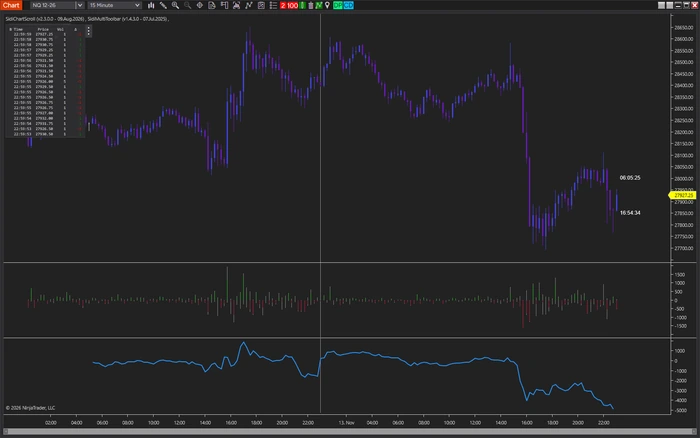
Delta, anchors and alerts.
Seven native NinjaTrader views. Select an image to inspect it at full resolution.
Read delta by bar and across a session
Read the current delta of a forming bar or the closing delta of a completed bar. The wicks show its intrabar extremes. Choose contracts or percent of processed bar volume. With 1,000 processed contracts, +250 delta is +25% of volume. The CumDelta line accumulates delta across bars and can reset at the start of each trading session. DeltaPro and CumDelta support both Price Change and Bid / Ask classification.
Find unusual delta and intrabar pullbacks
Relative Delta marks completed bars whose absolute closing delta reaches the selected percentile rank. At P95 with 100 reference bars, at least 95 preceding absolute deltas must be smaller. Delta Pullback marks bars where closing delta has retraced substantially from the largest intrabar excursion. For example, a largest excursion of +400 and a closing delta of +100 give a 75% retracement. Set the minimum excursion and percentage retracement.
Inspect confirmed divergences
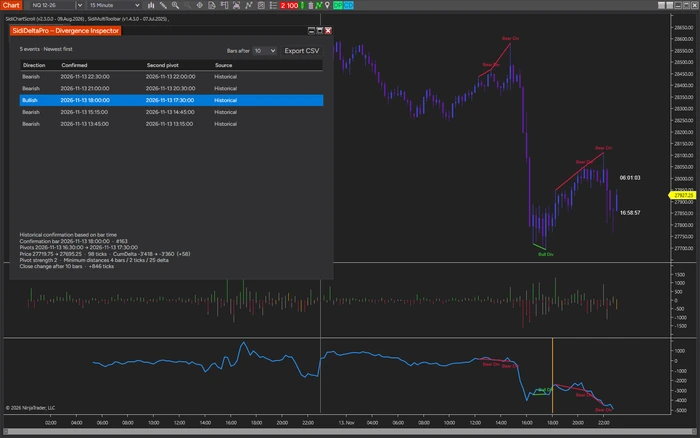
The Divergence Inspector lists bullish and bearish events with pivot times, confirmation time and the active filters. Select an event to jump to its confirmation bar. The outcome measure shows the change in closing price, in ticks, 5, 10 or 20 bars after confirmation. CSV export includes event times, source, filters and available outcomes. Divergence lines can appear on the price chart and in the CumDelta panel.
Anchor CumDelta to the range you want to study
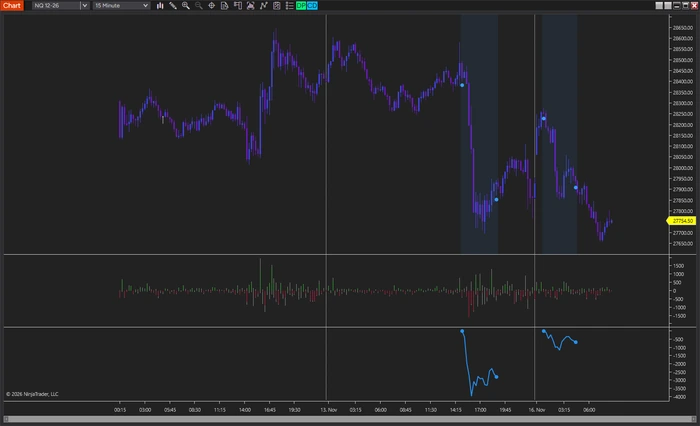
Use the CumDelta chart context menu to set a start and, if needed, an end bar. A manual anchor starts at zero at the close of its start bar. An open anchor continues to the latest bar with CumDelta data. Name and save multiple ranges and reopen them with the workspace. The price chart can highlight a range with background shading, endpoint markers or both.
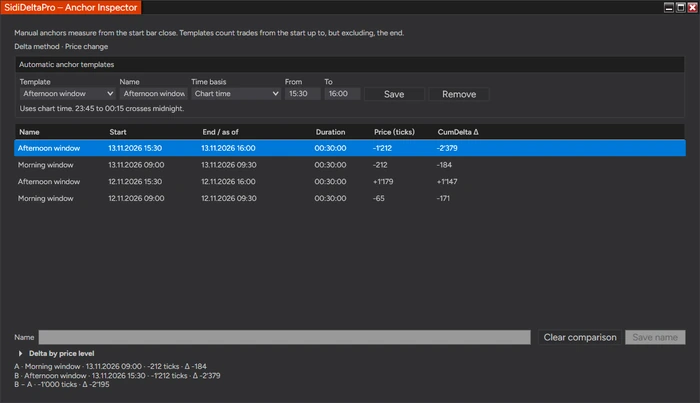
Compare two ranges in the Anchor Inspector by duration, price change in ticks and change in cumulative delta. Automatic templates define recurring windows by chart time, from session start or before session end. The price-level breakdown shows the strongest positive and negative net deltas and traded volume by price for the selected range.
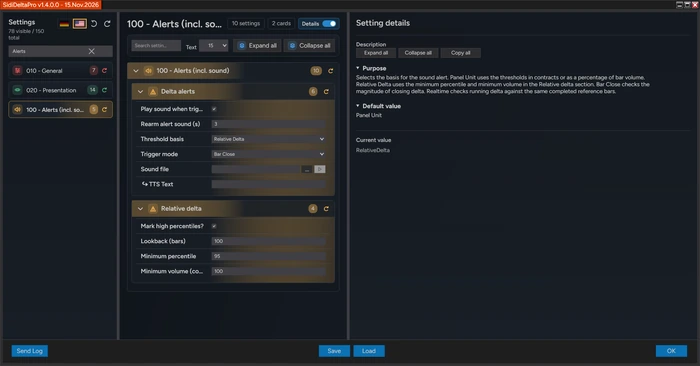
Set delta and divergence sound alerts
In DP, set a delta threshold in contracts, as a percentage of bar volume or as a relative percentile. Realtime checks running delta after each processed tick. Bar Close evaluates the completed bar when the next bar begins. A minimum volume can be set for the applicable threshold modes. In CD, configure alerts for confirmed bullish and bearish divergences with distinct sounds. Preview WAV files in RTS or generate the audio from your own text with text-to-speech.
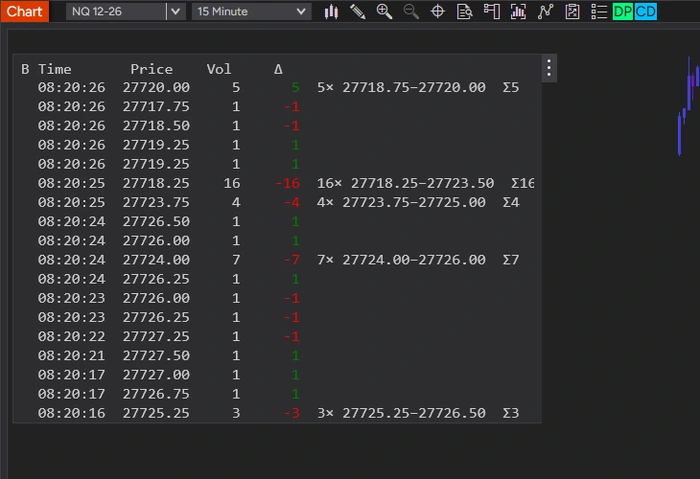
Read prints, clusters and possible icebergs
Choose Lite (Delta) or Time & Sales. The tape shows time, price, volume and delta. Group consecutive same-direction prints within a configurable time window into one row showing the print count, price range and combined volume. A B marks prints at or above the configured block volume. A grouped row carries the marker when at least one of its prints meets the block threshold. The separate iceberg heuristic flags possible candidates when a price level within a bar meets both the minimum volume and minimum number of prints. The marker identifies a pattern in the executed trades.
See factory defaults in Realtime Settings
Open DP for DeltaPro settings or CD for CumDelta settings. Descriptions are available in German and English. For example, the details for Tape Font Size show 9 px as the factory default and display the current value separately.
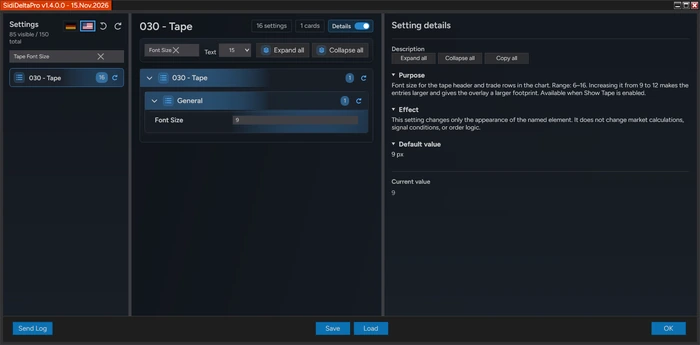
Two settings windows.
One chart workflow.
DP · DeltaPro
- Delta bars and wicks
- Delta in contracts or percent of processed bar volume
- Price-change or bid/ask classification
- Tape with time, price, volume and delta
- Optional grouping of consecutive same-direction prints within a configurable time window
- Delta thresholds and sound alerts for the forming bar or at bar close
CD · CumDelta
- Cumulative delta
- Confirmed bullish and bearish divergences
- Divergence Inspector with pivot and confirmation times
- Multiple start-to-end anchor ranges
- Anchor Inspector and configurable automatic windows
- Divergences and anchors on the price chart, configured through CumDelta
Use the data your chosen feature needs
You need NinjaTrader 8 on Windows, the imported SidiDeltaPro package, a valid licence and the tick data required by the selected feature. Bid/ask classification needs matching quotes alongside trades. Price Change uses the price movement between processed trades.
Sound alerts use a WAV file or audio generated from text-to-speech.
Before you install.
Q · 01How do I start an anchor?+
Q · 02When does the delta alert sound?+
Q · 03Which data does Bid / Ask need?+
SidiDeltaPro individually
Monthly
USD 10.90 / month
Lifetime
USD 219 one-time
Prices are in USD, plus any applicable taxes. Choose a monthly subscription or a one-time lifetime licence. You can also explore SidiDeltaPro in the free 14-day demo.