
Heiken Ashi, on your terms.
Body, outline and wick are three separate objects here, each with its own colour mode. On top of that come two bar formations that the tool finds for you and marks in the chart, each with its own direction, filters and marker style.
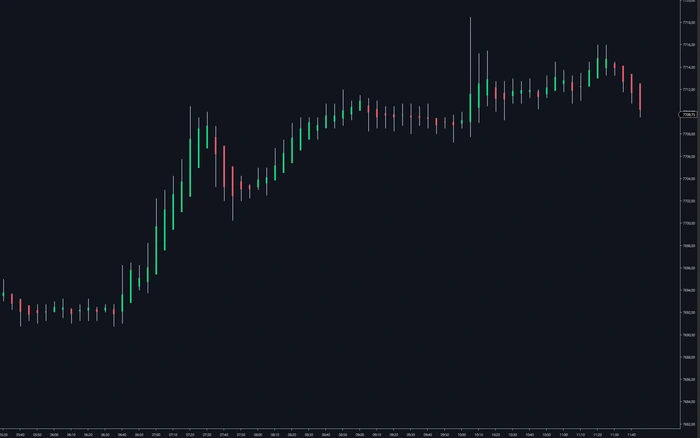
What it puts on your chart
Heiken Ashi smooths a bar series by averaging it against itself. The result is easier to read at a glance and, by construction, slower than price. Both of those are the point, and both are reasons to be careful with how it is drawn: a smoothed overlay that covers the real bars takes away the very thing it is supposed to comment on.
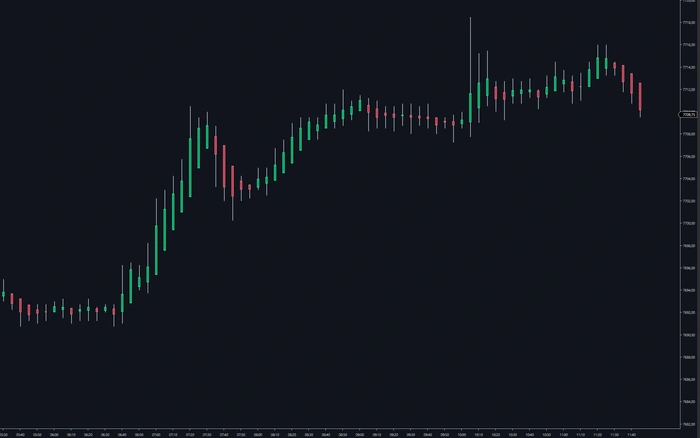
SidiHeikenAshi treats the bar as three separate objects. The body area, the outline around it and the wick each carry their own settings, and the body area and outline each have their own colour mode. Turn the fill off and the tool becomes an overlay. Turn it on and it becomes the chart. Neither choice is forced on you.
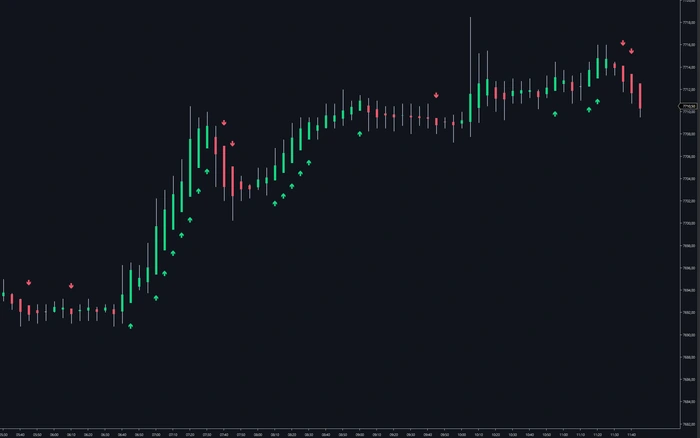
The second half of the tool finds two bar formations and marks them. Both arrive switched off, both are restricted to the direction you choose, and both can be filtered by bar size and by how many same-direction bars have already gone by. The 97 settings of version 3.3.0.0 are mostly there so those markers stay rare enough to be worth looking at.
Three parts of a bar, three sets of settings
Most Heiken Ashi implementations give you two colours and stop there. Here the body area, the body outline and the wick are configured separately, and the body area and the outline each have their own colour mode. Switch the fill off entirely and you get an outline overlay that sits on top of the real candles without hiding them, which is exactly what you want when Heiken Ashi is a second opinion rather than the chart.
Two formations, found and marked for you
A continuation bar is one where price never traded through the body in the opposite direction: for long, nothing traded below the body, for short nothing above it. A reversal bar is one that is completely engulfed by the bar before it. Both are found on closed bars, and both come with their own marker settings: which direction counts, how many bars in a row are still valid, and which of nineteen marker shapes appears, in which size and colour.
What you can change.
97 settings in version 3.3.0.0, read out of the installed indicator. The list below is what they are for.
Bars
- Body area with its own colour mode and opacity
- Body outline with its own colour mode, width and opacity
- Wick with its own colour and width
- Body fill can be switched off entirely for an outline-only overlay
- Max Days To Load caps how far back the calculation reaches
Continuation formation
- Marks bars where price never traded through the body against the direction
- Direction switch: off, long, short or both
- Consecutive-bar limit, so a long run of same-direction bars stops qualifying
- Marker shape, size, colour and opacity, separately for long and short
- Visual offset in ticks relative to the bar high or low
Reversal formation
- Marks a bar that is completely engulfed by the one before it
- Mode decides whether the two bars must share a colour (coherent) or differ (divergent)
- With mode off, nothing is marked regardless of the marker switch
- Minimum and maximum bar size in ticks as a filter, disabled with -1
- Own marker shape, size, colour and opacity per direction
In the chart
- Realtime Settings window, opened from a button in the chart toolbar
- Indicator name row can be hidden to keep the chart clean
- Bar index at the mouse position for precise navigation
- Drawing order against other indicators, set by Z value
- Logging to the NinjaScript output window, the Control Center log tab, or a file of its own
Nothing is on until you turn it on
Both formations ship switched off, and the reversal formation has a second switch that decides whether the two bars involved must share a colour or differ. That is deliberate: a marker that appears on half your bars stops being information within a session.
What is drawn
- Body area
- Body outline
- Wick
- Continuation marker
- Reversal marker
What you control per formation
- Direction: off, long only, short only or both
- Reversal mode: coherent or divergent bar colours
- Maximum consecutive bars before it stops counting
- Minimum and maximum bar size in ticks
- Marker shape from nineteen styles, separately for long and short
- Size in pixels, colour, opacity and a visual offset
Change it while the market runs
SidiHeikenAshi has its own Realtime Settings window, opened from a button in the chart toolbar. Colours, outlines, wicks, marker shapes and the direction switches change in the chart as you set them, and the window saves, loads and resets complete presets from its bottom bar. Finding the consecutive-bar limit that suits your instrument is a matter of trying three values, not of three chart reloads.
A few fields change what is calculated rather than how it is drawn, and those still ask for a chart reload (F5). Everything visual answers immediately.
Pick your licence.
Every plan includes free updates. Secure checkout handled by Freemius.
One licence, any of your computers
The licence is tied to your email address, not to a machine ID. You can install SidiHeikenAshi on as many computers as you like and run it on one of them at a time.
Before you install.
Q · 01What counts as a continuation bar?+
Q · 02What counts as a reversal bar?+
Q · 03Why is nothing marked when I install it?+
Q · 04Can I use it as an overlay instead of replacing my candles?+
Q · 05Which NinjaTrader version does it need?+
Q · 06What do I get in the free demo?+
Read more
Best NinjaTrader Chart Customization Features
See the best NinjaTrader chart customization features for footprint, profiles, alerts, and fast order-flow context when ES auction speed increases at open.
Top Footprint Visualization Settings for Fast Tape
Set top footprint visualization settings for NinjaTrader 8: color logic, imbalance thresholds, profiles, VPOC, and bar clarity in fast futures markets.
How to Configure Footprint Color Schemes
Configure footprint color schemes that separate delta, imbalances, VPOC, and volume context clearly when the order flow accelerates on NinjaTrader 8.
See it on your own chart.
SidiHeikenAshi is unlocked in the free 14-day demo, together with every other Sidi tool for NinjaTrader 8.
Start free 14-day demo → All tools and prices